Open-back border held by the badge's own magnet
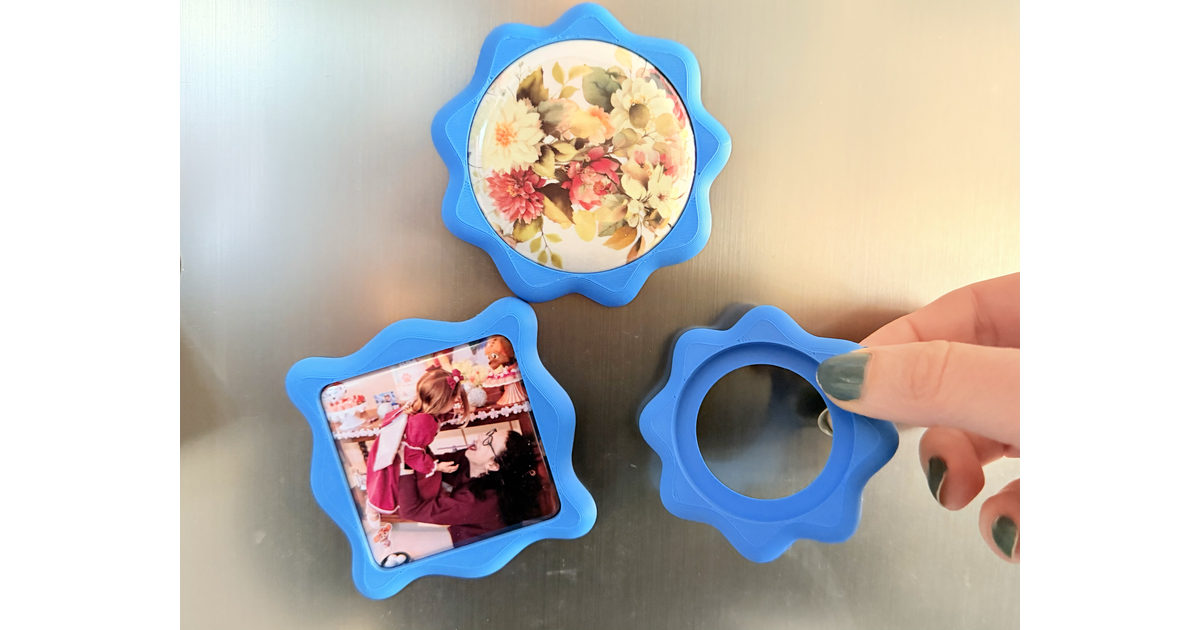
A border for bottons and pins of any size, square or circle: the badge drops into a pocket in the middle and the border frames it. The back is open, so the badge's own magnetic back sits against the fridge door and does the holding. One colour, one piece, printed face up, nothing to glue.
Pick the design you like in the editor, set the size of your botton, and print. To get a perfect fit, print the Botton Size Test model first: it sweeps a row of borders a step apart, so you can find the tolerance and the hole height your own botton press needs. Every machine presses a slightly different badge, so it is worth doing once before printing a border you want to keep.
Open back, no magnet to buy: Only a thin lip (0.6 mm by default) holds the badge in, so its own magnetic back touches the door directly — nothing glued in, and that open centre is also how you push the badge out to swap it. The piece ends up slightly thinner than the same design as a keychain.
Any botton size: Circle or square, set by the design you choose in the editor and the pocket depth you enter.
Seven settings: The design file, Botton Hole Height (pocket depth), rounded edges and their Offset, showing the botton in the preview, and the lip width and lip thickness.
Rounded edges: The outline grows by the Offset before it is rounded, so the piece ends up at the size it was drawn.
Reference values (Dataprint, China machine):
32 mm circle: −0.1 mm | Hole height: 3.4 mm
44 mm circle: −0.2 mm | Hole height: 4.4 mm
58 mm circle: −0.3 mm | Hole height: 5.2 mm
50 mm square: +0.8 mm | Hole height: 3.4 mm
A negative tolerance means the hole is drawn smaller than the badge, because a printed hole comes out a little wide; the square goes the other way and has to be opened up. Use these as a starting point, not an answer — a different machine will land somewhere else.
0.16mm High Quality profile
Tags: botton-border, fridge-magnet, pin-badge, no-glue, swappable, customizable, single-color, easy-print